
IDENTIFICATION AND FUNCTIONS OF HARDWARE PARTS Lesson Note
Learning Objectives
This SS1 COMPUTER HARDWARE AND GSM REPAIR lesson note covers IDENTIFICATION AND FUNCTIONS OF HARDWARE PARTS for First Term, Week 5.
Lesson Note
Learning Objectives
By the end of the lesson, students should be able to:
1. Define computer hardware.
2. Identify common hardware parts of a computer.
3. State the functions of different hardware parts.
4. Differentiate between input, output, processing and storage devices.
5. Identify the major components found inside a computer system unit.
6. Explain the functions of the motherboard, CPU, RAM, storage devices and power supply.
7. Identify common computer peripheral devices.
8. Explain the importance of different hardware components.
9. State basic methods of caring for computer hardware.
10. Identify some hardware parts commonly found in laptops and desktop computers.
A. MEANING OF COMPUTER HARDWARE
Computer hardware refers to the physical parts of a computer system that can be seen and touched.
Hardware includes both parts found inside the computer and devices connected outside the computer.
Examples of Computer Hardware: Keyboard, Mouse, Monitor, System unit, Motherboard, Central Processing Unit (CPU), Random Access Memory (RAM), Hard Disk Drive (HDD), Solid State Drive (SSD), Power Supply Unit (PSU), Printer, Scanner, Speakers, Webcam, Microphone and Network Interface Card (NIC)
B. CATEGORIES OF COMPUTER HARDWARE
Computer hardware can be classified according to the work it performs.
The major categories are:
1. Input devices
2. Output devices
3. Processing devices
4. Storage devices
5. Communication /networking devices
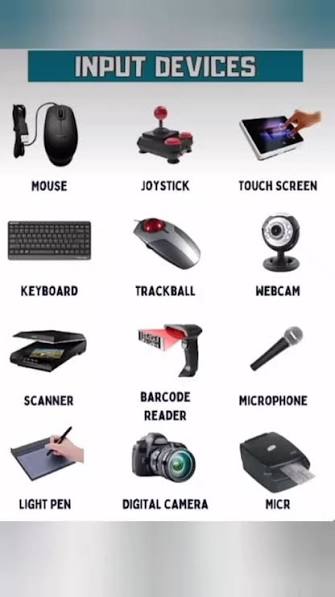
1. INPUT DEVICES
Input devices are hardware devices used to enter data and instructions into a computer.
i. Keyboard
A keyboard is an input device containing keys used to enter letters, numbers, symbols and commands into a computer.
Functions
- Enters text.
- Enters numbers.
- Executes commands.
- Provides shortcut keys.
- Allows users to interact with software.
ii. Mouse
A mouse is a pointing input device used to control the pointer or cursor on a computer screen.
Functions
- Moves the pointer.
- Selects items.
- Opens files and programs.
- Drags objects.
- Provides scrolling through the scroll wheel.
Common Mouse Actions
- Single click
- Double click
- Right click
- Drag and drop
- Scrolling
iii. Scanner
A scanner is an input device that converts printed documents, photographs or other physical materials into digital form.
Functions
- Scans documents.
- Scans photographs.
- Converts physical information into digital information.
- Allows scanned materials to be stored and edited on a computer.
iv. Microphone
A microphone is an input device that captures sound and converts it into an electrical/digital signal that a computer can process.
Functions
- Records voice.
- Enables audio communication.
- Used for video calls.
- Used for voice recording.
- Supports speech recognition.
v. Webcam
A webcam is a camera used to capture still images or video and send them to a computer.
Functions
- Captures video.
- Supports video conferencing.
- Takes photographs.
- Used for online classes and meetings.
- Can be used for security and monitoring applications.
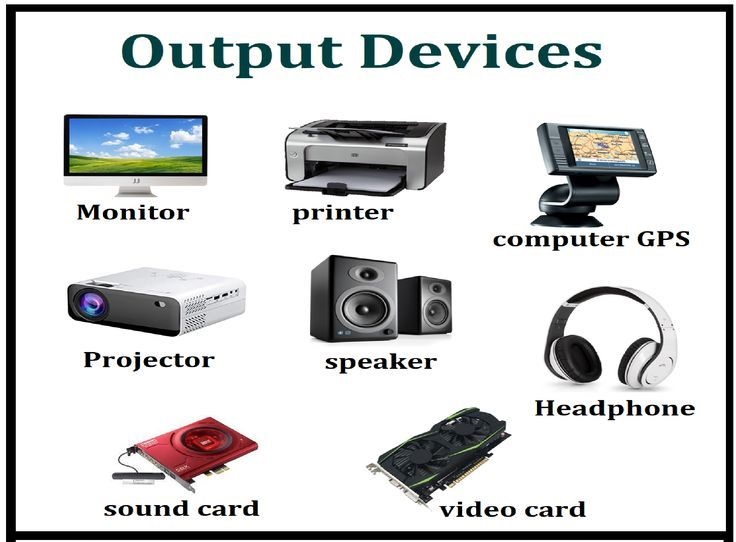
2. OUTPUT DEVICES
Output devices are hardware components that present processed information from a computer to the user.
i. Monitor
A monitor is an output device that displays text, images, videos and other information produced by a computer.
Functions
- Displays information.
- Shows pictures and videos.
- Displays software interfaces.
- Allows users to see the results of computer operations.
Common Types: LCD, LED and OLED
ii. Printer
A printer is an output device that produces a physical copy of digital information on paper or another suitable medium.
Functions
- Prints documents.
- Prints photographs.
- Produces reports.
- Produces labels and other printed materials.
Common Types: Inkjet printer, Laser printer and Thermal printer
iii. Speakers
Speakers are output devices that produce sound from a computer.
Functions
- Produce music.
- Play sound effects.
- Produce speech.
- Support audio and video applications.
iv. Projector
A projector is an output device that displays computer images or video on a large screen or suitable surface.
Uses
- Classroom teaching
- Presentations
- Meetings
- Training
- Demonstrations
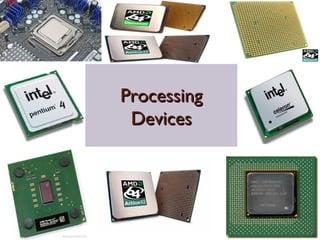
3. PROCESSING DEVICES
Processing devices are hardware components involved in processing data and executing instructions.
i. Central Processing Unit (CPU)
The Central Processing Unit (CPU) is the main processor of a computer. It executes instructions and performs calculations required by computer programs.
The CPU is often described as the brain of the computer, although a computer system depends on many other components to function.
Main Functions of the CPU
1. Executes program instructions.
2. Performs arithmetic operations.
3. Performs logical operations.
4. Controls the activities of other components.
5. Processes data.
Major Parts of the CPU
*Arithmetic and Logic Unit (ALU)
The ALU performs:
- Arithmetic operations such as addition and subtraction.
- Logical operations.
- Comparisons between values.
*Control Unit (CU)
The Control Unit coordinates the activities of the computer.
It:
- Fetches instructions.
- Interprets instructions.
- Controls the execution of instructions.
- Coordinates other components.
*Registers
Registers are very small, fast storage locations within the processor used to hold data, instructions or intermediate results temporarily during processing.
2. MOTHERBOARD
The motherboard is the main circuit board of a computer.
It provides connections through which major components communicate with one another.
Components Connected to the Motherboard
Depending on the computer, the motherboard may connect to: CPU, RAM, Storage devices, Graphics hardware, Expansion cards, USB ports, Network interfaces, Audio hardware and Power connections
Functions of the Motherboard
1. Connects major computer components.
2. Provides pathways for communication between components.
3. Distributes electrical power to appropriate components.
4. Provides slots and connectors for hardware.
5. Supports the operation of the computer as an integrated system.
3. RANDOM ACCESS MEMORY (RAM)
Random Access Memory (RAM) is temporary working memory used by a computer to hold data and instructions that are actively being used.
RAM is generally volatile, meaning its contents are lost when power is removed.
Functions of RAM
1. Temporarily stores data being processed.
2. Holds programs currently in use.
3. Provides fast access to working data.
4. Helps the computer run multiple programs.
Important Point
RAM is different from permanent storage.
For example, an SSD can store files even when the computer is turned off, while RAM normally does not retain its contents after power is removed.
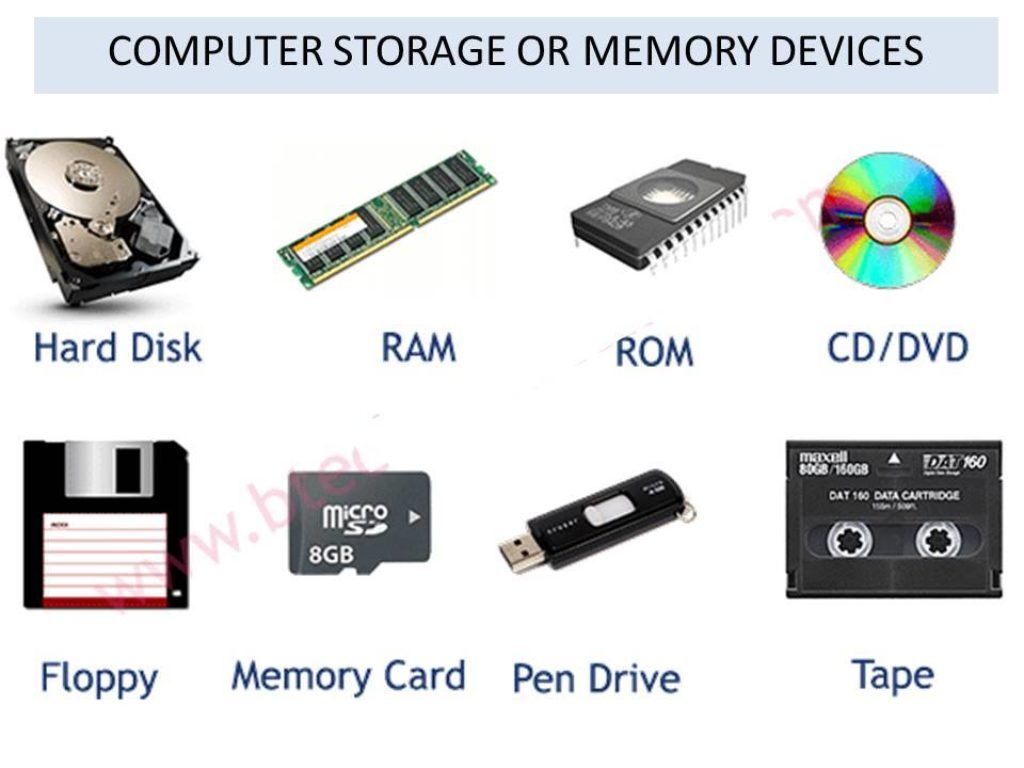
4. STORAGE DEVICES
Storage devices are hardware used to store data and programs for future use.
Examples: Hard Disk Drive (HDD), Solid State Drive (SSD), USB flash drive, Memory card and External hard drive
i. Hard Disk Drive (HDD)
An HDD is a storage device that uses magnetic disks to store digital information.
Functions
- Stores the operating system.
- Stores applications.
- Stores documents.
- Stores photographs and videos.
- Stores other digital files.
ii. Solid State Drive (SSD)
An SSD is a storage device that uses flash memory rather than spinning magnetic disks.
Advantages of SSD
- Generally faster than HDDs.
- Has no moving disk mechanism.
- Usually operates quietly.
- Can provide faster boot and application loading.
- Often uses less power than comparable HDDs.
iii. USB Flash Drive
A USB flash drive is a small portable storage device that connects to a computer through a USB port.
Functions
- Stores files.
- Transfers files.
- Provides portable storage.
- Can be used for backups.
iv. Memory Card
A memory card is a small removable storage device commonly used in smartphones, cameras and other electronic devices.
Examples include:
- SD cards
- microSD cards
5. POWER SUPPLY UNIT (PSU)
The Power Supply Unit (PSU) is the component in a desktop computer that converts electrical power from the mains into suitable power for the computer's internal components.
Functions of the PSU
1. Supplies electrical power to computer components.
2. Converts incoming electrical power into required DC outputs.
3. Provides power to the motherboard.
4. Provides power to storage devices.
5. Provides power to other compatible internal components.
Safety
The PSU contains electrical components that can retain dangerous electrical energy even after a computer is switched off. Students should not open or repair a PSU without proper training and supervision.
6. GRAPHICS PROCESSING UNIT (GPU)
A Graphics Processing Unit (GPU) is a processor designed to perform graphics-related calculations.
It may be:
- Integrated into the CPU or motherboard platform.
- A separate dedicated graphics card.
Functions
1. Processes graphics.
2. Produces images for display.
3. Supports video playback.
4. Supports graphics-intensive applications.
5. Can accelerate certain computing tasks.
7. COOLING FAN AND HEAT SINK
Computer components produce heat during operation.
Heat Sink
A heat sink is a component designed to absorb and dissipate heat from a component such as a processor.
Cooling Fan
A cooling fan moves air through or around the computer to help remove heat.
Importance
Proper cooling:
- Prevents excessive heat buildup.
- Helps maintain stable operation.
- Reduces the risk of overheating.
- Can improve hardware reliability.
8. NETWORK INTERFACE CARD (NIC)
A Network Interface Card (NIC) allows a computer to connect to a network.
A NIC can support:
- Wired Ethernet
- Wireless networking
Functions
1. Connects a computer to a network.
2. Sends data over a network.
3. Receives network data.
4. Provides a network interface for communication.
9. SOUND CARD / AUDIO HARDWARE
Audio hardware enables a computer to process sound.
Depending on the system, audio functions may be built into the motherboard or provided through a separate sound card.
Functions
- Processes audio input.
- Processes audio output.
- Supports microphones.
- Supports speakers and headphones.
- Enables sound recording and playback.
10. PORTS AND CONNECTORS
A port is a physical interface through which a device can connect to a computer.
Common Computer Ports
USB Port
Used to connect devices such as:
- Flash drives
- Keyboards
- Mice
- External storage devices
HDMI Port
Used to transmit digital video and audio to compatible displays.
Ethernet Port
Used for wired network connections.
Audio Port
Used to connect audio devices such as headphones, microphones or speakers, depending on the port.
11. SYSTEM UNIT
The system unit is the main enclosure of a desktop computer containing important internal components.
It may contain: Motherboard, CPU, RAM, Storage devices, PSU, Cooling system, Graphics hardware and Expansion cards
The monitor, keyboard and mouse are normally external devices and are not themselves the system unit.
11. PERIPHERAL DEVICES
A peripheral device is a hardware device connected to a computer to provide input, output, storage, communication or other functions.
Examples: Keyboard, Mouse, Printer, Scanner, Webcam, External hard drive, Speakers, Microphone and USB flash drive
C. IDENTIFICATION OF HARDWARE PARTS
A computer technician should be able to identify hardware parts by their physical appearance, labels, connectors and functions.
Hardware Part Identification Main Function
Keyboard Has many keys Enters data and commands
Mouse Small pointing device Controls pointer
Monitor Display screen Shows information
Printer Printing machine Produces hard copies
Scanner Scanning unit Converts physical documents to digital form
CPU Processor chip Executes instructions
Motherboard Large main circuit board Connects components
RAM Memory modules Temporary working memory
HDD Magnetic storage drive Stores data
SSD Flash-based storage Stores data
PSU Power supply box Supplies electrical power
GPU Graphics processor/card Processes graphics
NIC Network interface Connects computer to network
Speaker Audio output device Produces sound
Microphone Audio input device Captures sound
Webcam| Camera Captures video
USB flash drive Small portable storage Stores/transfers files
D. DIFFERENCE BETWEEN INPUT, OUTPUT AND STORAGE DEVICES
Category Meaning Examples
Input Used to enter data Keyboard, mouse, scanner
Output Presents processed information Monitor, printer, speakers
Storage Stores data and programs HDD, SSD, flash drive
Processing Executes instructions CPU, GPU
Communication Connects devices/networks NIC, Wi-Fi adapter
E. IMPORTANCE OF IDENTIFYING HARDWARE PARTS
Proper identification of hardware parts is important because it helps a computer user or technician to:
1. Understand the functions of components.
2. Install hardware correctly.
3. Troubleshoot computer problems.
4. Replace faulty components.
5. Upgrade a computer.
6. Maintain computer equipment.
7. Avoid connecting devices incorrectly.
8. Select suitable replacement parts.
9. Diagnose hardware faults.
10. Handle equipment safely.
F. BASIC CARE OF COMPUTER HARDWARE
Computer hardware should be handled carefully.
Ways to Care for Hardware
1. Keep computers clean and free from excessive dust.
2. Keep liquids away from computer equipment.
3. Provide proper ventilation.
4. Avoid blocking cooling vents.
5. Handle components carefully.
6. Avoid dropping portable devices.
7. Shut down computers properly.
8. Protect equipment from electrical problems.
9. Keep cables organized.
10. Do not force connectors into ports.
11. Keep food and drinks away from computer equipment.
12. Allow trained technicians to handle internal repairs.
G. HARDWARE SAFETY PRECAUTIONS
When handling computer hardware:
- Switch off and unplug equipment before appropriate internal maintenance.
- Follow the manufacturer’s safety instructions.
- Use appropriate tools.
- Avoid touching electrical contacts unnecessarily.
- Handle circuit boards by their edges where appropriate.
- Use anti-static precautions when handling sensitive components.
- Never open power supplies without proper training.
- Do not work on electrical equipment in wet conditions.
- Seek assistance from a qualified technician when necessary.
SUMMARY
Computer hardware consists of the physical parts of a computer system.
Hardware can be classified into input, output, processing, storage and communication devices.
Input devices such as the keyboard, mouse, scanner, microphone and webcam allow users to enter data. Output devices such as the monitor, printer, speakers and projector present information to users.
The CPU processes instructions, while the motherboard provides connections between major components. RAM provides temporary working memory, while storage devices such as HDDs, SSDs and flash drives retain data.
The PSU supplies electrical power to the computer’s internal components. Other important hardware includes the GPU, cooling system, NIC, ports and connectors.
Understanding the identification and functions of hardware parts is essential for proper computer operation, maintenance, upgrading and troubleshooting.
Evaluation
OBJECTIVE QUESTIONS
Choose the correct answer from options A–D.
1. Which of the following is an input device?
A. Monitor
B. Keyboard
C. Speaker
D. Projector
2. What is the main function of the CPU?
A. To print documents
B. To execute instructions and process data
C. To display pictures
D. To store paper documents
3. Which hardware component is the main circuit board of a computer?
A. Keyboard
B. Motherboard
C. Mouse
D. Printer
4. Which of the following is mainly used as temporary working memory?
A. RAM
B. SSD
C. Printer
D. Monitor
5. Which device is used to produce a hard copy of a document?
A. Scanner
B. Printer
C. Mouse
D. Microphone
6. Which of the following is a storage device?
A. Keyboard
B. Monitor
C. SSD
D. Speaker
7. What is the major function of a computer’s PSU?
A. To display images
B. To supply electrical power to computer components
C. To enter text
D. To scan documents
8. Which hardware device is used to capture sound?
A. Microphone
B. Monitor
C. Printer
D. Projector
9. Which component is primarily responsible for processing graphics?
A. GPU
B. Keyboard
C. PSU
D. Scanner
10. Which of the following is used to connect a computer to a network?
A. NIC
B. Speaker
C. Monitor
D. Printer
THEORY QUESTIONS
1a. Define computer hardware and state five examples of computer hardware.
1b. Identify five input devices and explain the function of each.
2a. State five output devices and explain the function of each.
2b. Explain the functions of the following:
a. CPU
b. Motherboard
c. RAM
d. HDD/SSD
e. Power Supply Unit
2c. State five ways of caring for and maintaining computer hardware.