
INTRODUCTION TO COMPUTER HARDWARE AND GSM REPAIRS. Lesson Note
This SS1 COMPUTER HARDWARE AND GSM REPAIR lesson note covers INTRODUCTION TO COMPUTER HARDWARE AND GSM REPAIRS. for First Term, Week 1.
Learning Objectives
- By the end of the lesson, students should be able to:
- Define computer hardware.
- Identify the major components of a computer system.
- Distinguish between hardware and software.
- Explain the meaning of GSM.
- Identify common GSM devices and their basic components.
- Explain the importance of computer hardware and GSM repairs.
- Identify common tools used in computer hardware and GSM repairs.
- State basic safety precautions when repairing electronic devices.
Lesson Note
LESSON ONE (INTRODUCTION TO COMPUTER HARDWARE)
A. MEANING OF COMPUTER HARDWARE
Computer hardware refers to the physical components of a computer system that can be seen and touched.
Examples include: Keyboard, Mouse, Monitor, System unit, Motherboard, Hard disk drive, Solid-state drive (SSD). RAM, Processor (CPU), Power supply unit, Speakers, Printer and Webcam
Hardware works together with software to enable a computer to perform different tasks.
Hardware is the physical part of a computer, while software consists of programs and instructions that tell the hardware what to do.
For example:
Keyboard → Hardware
Windows → Software
Mouse → Hardware
Microsoft Word → Software
A computer cannot function effectively without both hardware and software.
B. MAJOR CCATEGORIES OF COMPUTER HARDWARE
Computer hardware can be grouped according to the functions they perform.
1. INPUT DEVICES
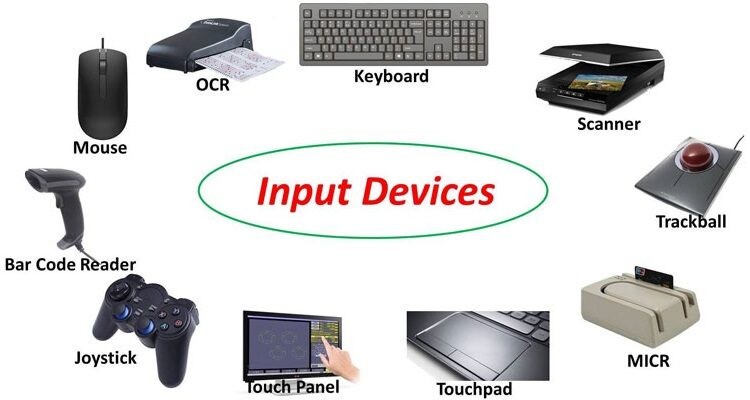
Input devices are hardware components used to enter data and instructions into a computer.
Examples include: Keyboard, Mouse, Scanner, Microphone, Webcam, Joystick and Touchpad
A keyboard is used to enter letters, numbers and commands into a computer.
2. OUTPUT DEVICES
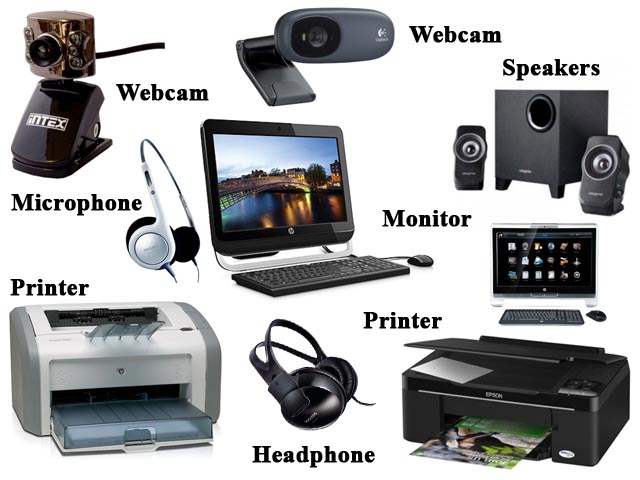
Output devices present processed information from the computer to the user.
Examples include: Monitor, Printer, Speakers, Projector and Headphones
A monitor displays text, pictures and videos produced by the computer.
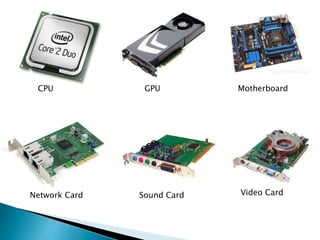
3. PROCESSING DEVICES
Processing devices handle and process data. The major processing device is the Central Processing Unit (CPU).
The CPU is often described as the brain of the computer because it performs calculations and controls many computer operations.
4. STORAGE DEVICES
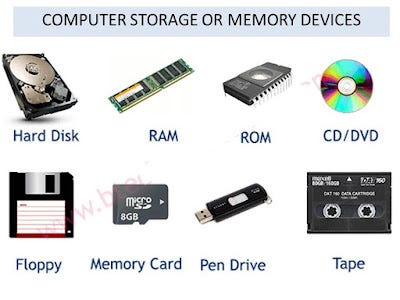
Storage devices are used to store data and information.
Examples include: Hard Disk Drive (HDD), Solid-State Drive (SSD), USB flash drive, Memory card and Optical disc
Storage can be used to keep files even after the computer has been switched off.
C. INTERNAL COMPONENTS OF A COMPUTERI
Some important components found inside a computer system include:
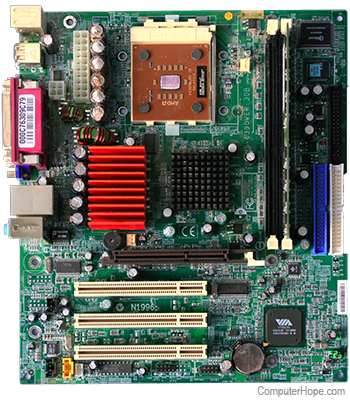
1. MOTHERBOARD
The motherboard is the main circuit board of a computer. It provides connections through which different components communicate with one another.
It may contain or connect to: CPU, RAM, Storage devices, Expansion cards, Ports and Power connections
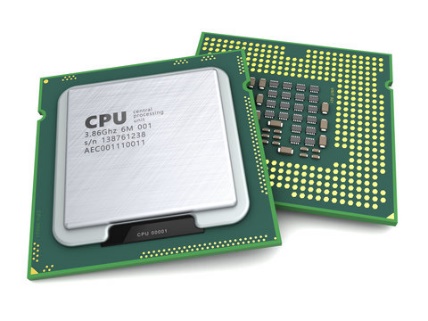
2. CENTRAL PROCESSSING UNIT (CPU)
The CPU processes instructions and performs calculations. It is called the brain of the computer.
It is responsible for executing instructions given by computer programs.
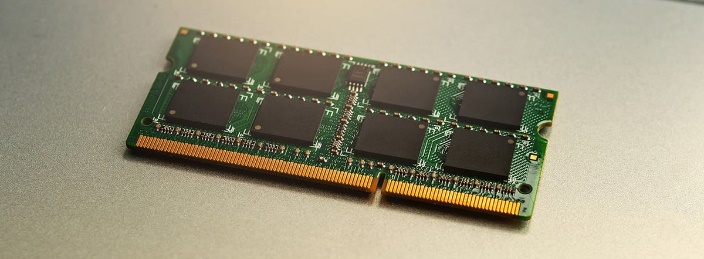
3. RANDOM ACCESS MEMORY (RAM)
RAM is a temporary memory used by the computer to hold data and programs that are currently being used.
RAM is volatile, meaning that its contents are normally lost when power is removed.
4. HARD DISK DRIVE (HDD)
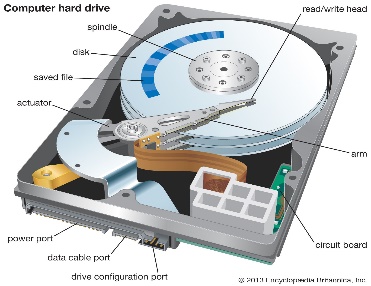
An HDD is a storage device used for storing operating systems, applications, documents, pictures, videos and other files.
5. SOLID-STATE DRIVE (SSD)
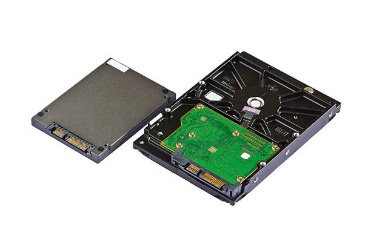
An SSD is another type of storage device. It uses electronic memory rather than spinning magnetic disks.
SSDs generally provide faster access to stored data than traditional HDDs.
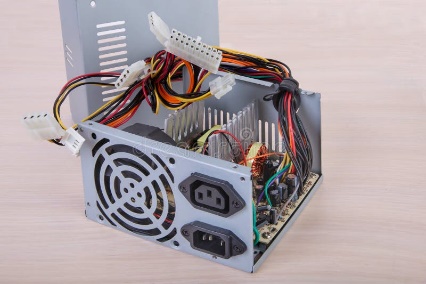
6. POWER SUPPLY UNIT (PSU)
The PSU supplies the appropriate electrical power to the various components of a desktop computer.
7. COOLING SYSTEM
Computer components produce heat during operation. Cooling systems help prevent excessive heat.
Examples include: Fans, Heat sinks and Thermal compounds
LESSON TWO (GSM)
A. MEANING OF GSM
GSM means Global System for Mobile Communications. It is a standard technology used for mobile communication. GSM technology has traditionally supported services such as: voice calls, text messaging (SMS), mobile data and subscriber identification through a SIM card
A mobile phone is an electronic communication device that contains several hardware components working together.
B. INTRODUCTION TO GSM REPAIRS
GSM repair involves identifying, diagnosing and fixing faults in mobile phones and related communication devices.
GSM repair technicians may work on faults involving: Charging, Power, Display, Audio, Network connection, Buttons, SIM detection, Battery connection, Software and Internal circuit boards
GSM repair requires knowledge of electronics, mobile-phone components, diagnostic procedures and safe handling of electronic devices.
C. COMMON PARTS OF A MOBILE PHONE
A mobile phone contains many components. Some important ones include:
1. Battery: The battery supplies electrical energy to the phone.
2. Display/Screen: The display allows the user to see information such as text, images, menus and videos.
3. Motherboard/Logic Board: This is the main circuit board of the phone. Many electronic components are mounted on or connected to it.
4. Charging Port: The charging port provides a connection for charging the battery and, depending on the device, transferring data.
5. SIM Card Slot: The SIM slot holds the SIM card used by the mobile network service.
6. Camera: The camera captures photographs and videos.
7. Speaker: The speaker produces sound for calls, media and other phone functions.
8. Microphone: The microphone converts sound into electrical signals that can be processed by the phone.
9. Antenna: The antenna helps the phone communicate with wireless networks.
10. Power Button: The power button is used to switch the phone on or off and perform other functions depending on the device.
D. COMMON GSM FAULTS
A mobile phone may develop different types of faults.
1. Power Fault: The phone may fail to switch on or may repeatedly switch off.
Possible causes can include: Battery problems, Damaged power connections, Faulty components and Software problems
2. Charging Fault: The phone may fail to charge properly.
Possible causes include: Damaged charging port, Faulty charger or cable, Battery problems and Internal circuit problems
3. Display Fault: The screen may fail to display information correctly.
Possible causes include: Damaged display, Loose connection, Software problems and Faulty internal components
4. Network Fault: The phone may have difficulty connecting to a mobile network.
Possible causes include: SIM-related problems, Network coverage problems, Antenna problems and Software or hardware faults
5. Audio Fault: The speaker or microphone may not function properly.
Possible causes include: Damaged speaker, Blocked openings, Faulty microphone and Internal circuit problems
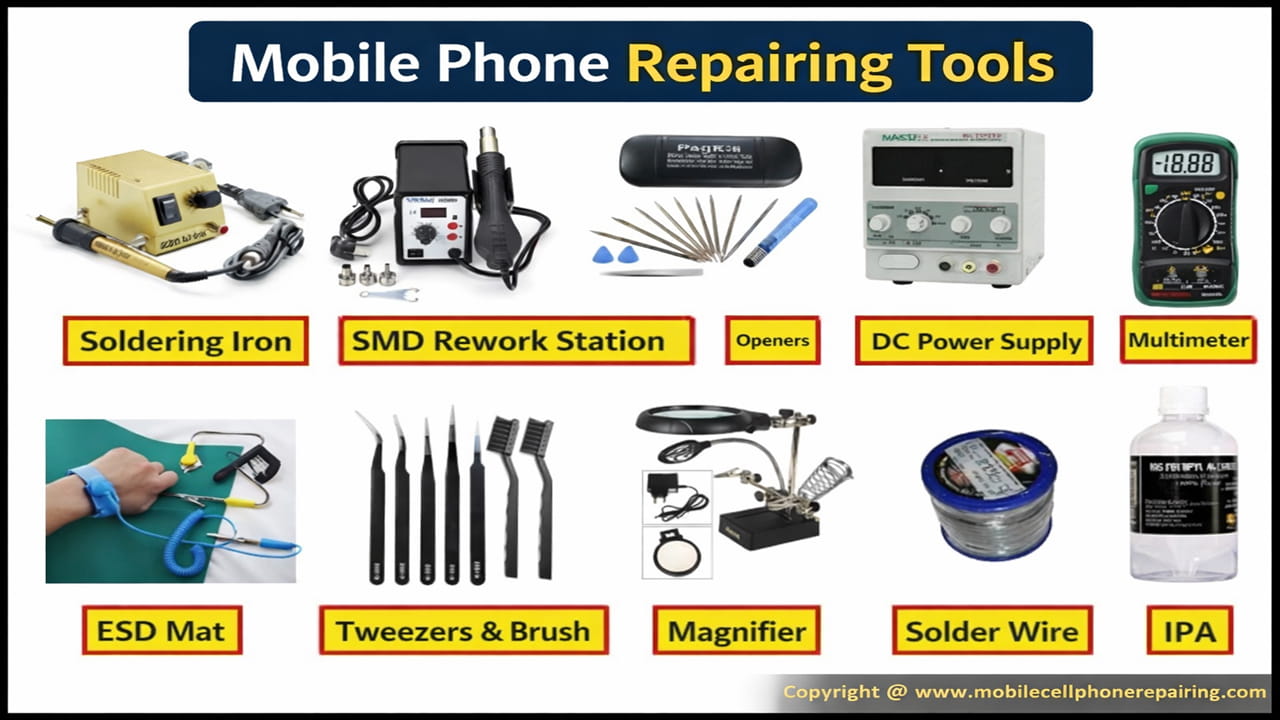
E. TOOLS USED IN COMPUTER HARDWARE AND GSM REPAIRS
Different repair jobs require different tools.
Common tools include: Screwdrivers, Tweezers, Multimeter, soldering equipment, soldering iron, Solder wire, Desoldering tools, cleaning brushes, Anti-static wrist strap, magnifying glass, Precision screwdriver set, Pliers, Sludgers or plastic opening tools
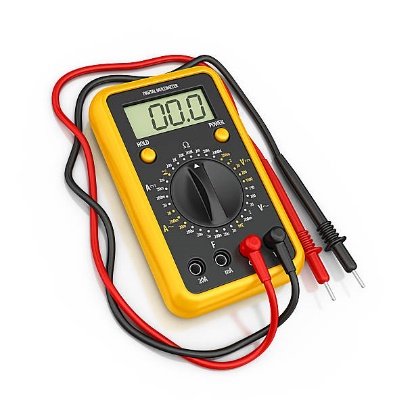
F. MULTIMETER
A multimeter is an electronic measuring instrument used to measure electrical quantities such as voltage, resistance and current. It is useful for diagnosing electrical and electronic faults.
G. IMPORTANCES OF COMPUTER HARDWARE AND GSM REPAIR
Help identify and correct faults in electronic devices.
Extend the useful life of computers and mobile phones.
Reduce unnecessary replacement of faulty devices.
Save money when suitable repairs can be made.
Provide opportunities for technical employment and entrepreneurship.
Help users maintain their electronic devices properly.
Develop practical problem-solving skills.
Support the maintenance of communication and computing equipment.
H. BASIC SAFETY PRECAUTIONS
Safety is very important when working with computers and mobile phones. Students should:
i) Switch off and disconnect equipment before appropriate repair work.
ii) Keep liquids away from electronic devices.
iii) Use the correct tool for each task.
iv) Handle circuit boards carefully.
v) Avoid touching electrical connections unnecessarily.
vi) Keep small components in a safe place.
vii) Use appropriate anti-static protection when handling sensitive components.
viii) Keep the work area clean and well organized.
ix)Avoid forcing components into place.
x) Seek guidance from a qualified technician when a repair is beyond their level of training.
I. DIFFERENCES BETWEEN COMPUTER HARDWARE AND GSM REPAIRD
Computer Hardware GSM Repairs
i) Deals mainly with computer components Deals mainly with mobile phones and
and systems related devices
ii) Components include motherboard, RAM, Components include battery, display,
CPU and storage charging port and mobile-phone circuit board
Uses computer repair and diagnostic tools Uses electronic and precision repair tools
Focuses on faults affecting computers Focuses on faults affecting mobile communication devices
May involve desktop and laptop computers Mainly involves mobile phones and similar devices
Evaluation
OBJECTIVE QUESTIONS
Choose the correct option from A–D.
1. Which of the following is an example of computer hardware?
A. Windows
B. Keyboard
C. Microsoft Word
D. Antivirus program
2. The main circuit board of a computer is called the _____.
A. Keyboard
B. Monitor
C. Motherboard
D. Speaker
3. What does GSM stand for?
A. General System Machine
B. Global System for Mobile Communications
C. General Service for Machines
D. Global Software Management
4. Which of the following is mainly used for temporary storage of data currently being processed?
A. RAM
B. Printer
C. Monitor
D. Keyboard
5. Which component supplies electrical power to the various parts of a desktop computer?
A. CPU
B. RAM
C. Power Supply Unit
D. Mouse
6. Which of the following is commonly associated with charging a mobile phone?
A. Charging port
B. Monitor
C. Keyboard
D. Printer
7. Which instrument can be used to measure voltage and resistance?
A. Screwdriver
B. Multimeter
C. Tweezers
D. Brush
8. Which of the following is an output device?
A. Keyboard
B. Mouse
C. Monitor
D. Scanner
9. GSM repairs mainly involve the diagnosis and repair of faults in _____.
A. Mobile phones and related devices
B. Tables and chairs
C. Books and notebooks
D. Clothing materials
10. Which of the following is an important safety precaution during electronic repairs?
A. Pour water on the circuit board
B. Use the correct tool for the task
C. Force every component into position
D. Work with damaged electrical connections exposed
Theory Questions
1a. What is computer hardware?
1b. State five examples of computer hardware.
2a. Explain the meaning of GSM.
2b. Mention five common components of a mobile phone.
c) State five safety precautions that should be observed when carrying out computer hardware or GSM repairs.