
CLASSIFICATION OF COMPUTERS Lesson Note
This SS1 COMPUTER HARDWARE AND GSM REPAIR lesson note covers CLASSIFICATION OF COMPUTERS for First Term, Week 3.
Learning Objectives
- At the end of the lesson, students should be able to:
- 1. Define a computer.
- 2. Explain the meaning of classification of computers.
- 3. Classify computers according to their method of operation.
- 4. Classify computers according to their purpose.
- 5. Classify computers according to size and processing capacity.
- 6. Identify examples of different types of computers.
- 7. Explain the characteristics of analogue, digital and hybrid computers.
- 8. Differentiate between general-purpose and special-purpose computers.
Lesson Note
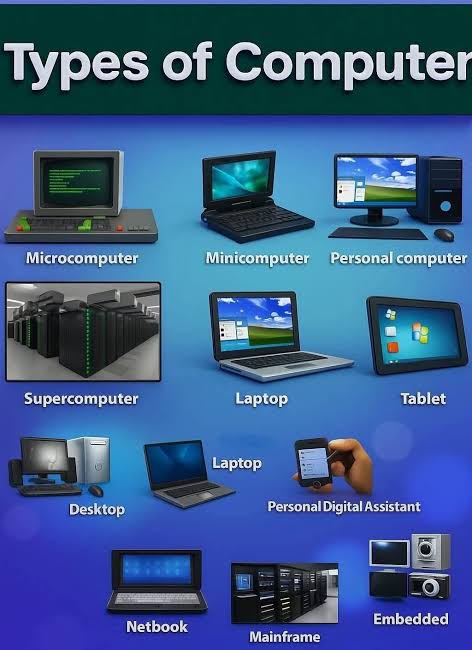
A. Meaning of a Computer
A computer is an electronic device that accepts data as input, processes the data according to a set of instructions, stores information and produces meaningful results as output.
A computer performs four major basic operations:
- Input – entering data into the computer.
- Processing – manipulating the data.
- Storage – keeping data and information for future use.
- Output – presenting the processed information to the user.
Examples of computers include desktop computers, laptops, tablets, smartphones, servers, mainframe computers and supercomputers.
B. Meaning of Classification of Computers
Classification of computers means grouping computers into different categories according to their characteristics, method of operation, purpose, size, processing capacity and the type of data they handle.
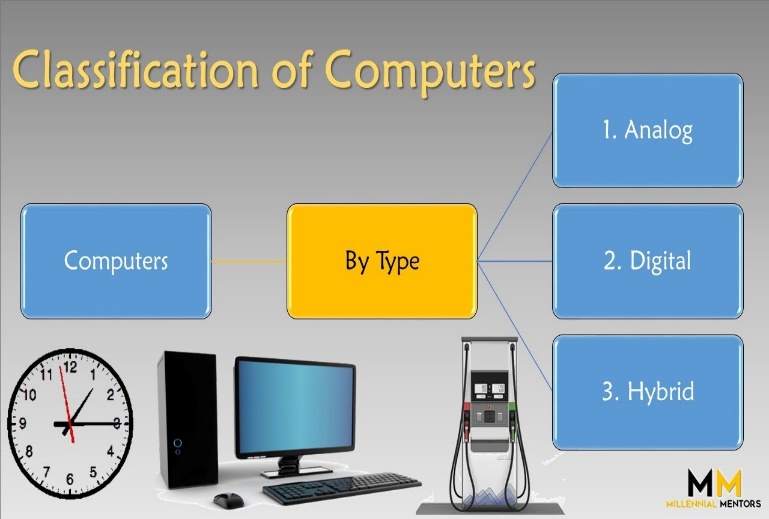
Computers can be classified mainly
according to:
1. Method of operation
2. Purpose
3. Size and processing capacity
1. Classification According to Method of Operation
Based on how computers process data, they are classified into:
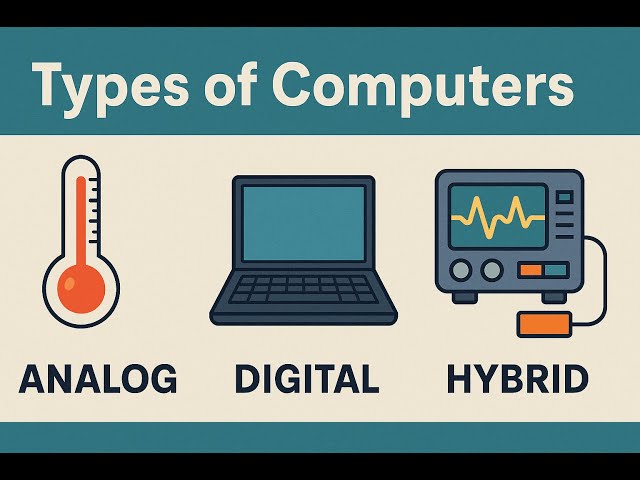
i. Analogue computers
ii. Digital computers
iii. Hybrid computers
i. Analogue Computers
An analogue computer is a computer that processes data represented by continuously changing physical quantities.
Analogue computers deal mainly with continuous data.
Examples of quantities that can be measured continuously include:
- Temperature
- Speed
- Pressure
- Voltage
- Current
- Distance
- Sound intensity
Characteristics of Analogue Computers
i. They work with continuous data.
ii. They measure physical quantities.
iii. Their results may be displayed using meters, gauges or graphs.
iv. They are useful for scientific and engineering applications.
v. They are generally less common as general-purpose computers today.
Examples
- Analogue thermometer systems
- Some aircraft instrumentation systems
- Industrial process-control systems
- Older scientific measuring machines
Uses
Analogue computers can be used for:
- Measuring temperature
- Monitoring pressure
- Measuring speed
- Industrial control
- Scientific experiments
- Monitoring physical processes
ii. Digital Computers
A digital computer is a computer that processes data in discrete form, usually represented internally using binary digits, 0 and 1.
Digital computers are the most common type of computers used today.
Examples
- Desktop computers
- Laptop computers
- Tablets
- Smartphones
- Digital calculators
- Point-of-sale (POS) systems
- ATMs
Characteristics of Digital Computers
a. They process discrete data.
b. They use binary digits internally.
c. They can store large amounts of information.
d. They provide accurate and fast processing.
e. They can perform arithmetic and logical operations.
f. They can be programmed to perform different tasks.
g. They are widely used in homes, schools, offices, banks and businesses.
Uses of Digital Computers
Digital computers are used for:
- Word processing
- Internet browsing
- Banking
- Education
- Communication
- Business operations
- Graphic design
- Entertainment
- Data storage
- Scientific calculations
iii. Hybrid Computers
A hybrid computer combines features of both analogue and digital computers.
It can handle continuous data like an analogue computer and process digital data like a digital computer.
Characteristics of Hybrid Computers
a. They combine analogue and digital operations.
b. They can measure continuous physical quantities.
c. They can process digital information.
d. They are useful where both types of processing are required.
e. They are commonly used in specialized scientific, medical and industrial systems.
Examples and Applications
Hybrid computer systems can be found in:
- Medical monitoring equipment
- Industrial control systems
- Scientific research systems
- Aircraft and aerospace systems
- Hospital equipment
- Weather and environmental monitoring systems
Example
A medical monitoring system may measure a patient’s physical condition continuously and then use a digital computer to process, store and display the measurements.
2. Classification According to Purpose
Based on purpose, computers can be classified into:
i. General-purpose computers
ii. Special-purpose computers
i. General-Purpose Computers
A general-purpose computer is designed to perform many different types of tasks.
The user can install different programs or applications depending on the task to be performed.
Examples
- Desktop computers
- Laptop computers
- Tablets
- Smartphones
Uses
A general-purpose computer can be used for:
- Typing documents
- Browsing the internet
- Playing games
- Watching videos
- Programming
- Creating presentations
- Calculations
- Data management
- Communication
Advantages
1. They can perform many different tasks.
2. They are flexible.
3. Different software can be installed.
4. They can serve different users and purposes.
5. They can be upgraded in many cases.
ii. Special-Purpose Computers
A special-purpose computer is designed to perform a particular task or a limited set of related tasks.
It Is also called a dedicated computer when it is built into a system to perform a specific function.
Examples
- ATM control systems
- Traffic-light control systems
- Washing-machine controllers
- Industrial control systems
- Some electronic weighing systems
- Certain medical equipment
Advantages
1. They are designed for specific tasks.
2. They can perform their designated tasks efficiently.
3. They may require less user interaction.
4. They can be incorporated into larger machines or systems.
3. Classification According to Size and Processing Capacity
Computers can also be classified according to their physical size, processing power, storage capacity and number of users they can support.
The major categories are:
i. Microcomputers
ii. Minicomputers
iii. Mainframe computers
iv. Supercomputers
i. Microcomputers
A microcomputer is a relatively small computer that uses a microprocessor as its central processing unit.
Microcomputers are commonly designed for individual users.
Examples
- Desktop computers
- Laptop computers
- Tablet computers
- Some small personal computers
Characteristics
1. They are relatively small.
2. They are usually designed for individual users.
3. They are less expensive than large computer systems.
4. They can perform many different tasks.
5. They are widely used in homes, schools and offices.
Uses
Microcomputers are used for:
- Education
- Office work
- Internet access
- Programming
- Entertainment
- Graphic design
- Business activities
ii. Minicomputers
A minicomputer is a medium-sized computer that traditionally has greater processing capacity than many personal computers and can support multiple users.
Historically, minicomputers were widely used by universities, laboratories, factories and medium-sized organizations.
Today, many roles formerly associated with minicomputers are handled by modern servers and other computer systems.
Characteristics
1. They are more powerful than early personal computers.
2. They can support multiple users.
3. They can handle larger workloads than ordinary personal computers.
4. They were commonly used in organizations and institutions.
5. Modern servers have replaced many traditional minicomputer applications.
Uses
- Scientific research
- Industrial operations
- Institutional computing
- Database management
- Multi-user applications
iii. Mainframe Computers
A mainframe computer is a large, powerful computer designed to process huge amounts of data and support many users and applications simultaneously.
Mainframes are commonly used by large organizations that require high reliability, security and large-scale data processing.
Characteristics
1. They have high processing capacity.
2. They can handle very large amounts of data.
3. They can support many users at the same time.
4. They are designed for reliability.
5. They are suitable for large-scale transaction processing.
6. They can operate continuously for long periods.
Uses
Mainframe computers are used in:
- Banks
- Insurance companies
- Government institutions
- Large business organizations
- Airline reservation systems
- Large databases
- Financial transaction processing
iv. Supercomputers
A supercomputer is an extremely powerful computer designed to perform very large and complex calculations at very high speeds.
Supercomputers are among the most powerful computing systems available.
Characteristics
1. They have extremely high processing capacity.
2. They can perform huge numbers of calculations quickly.
3. They are very expensive to build and operate.
4. They are used for highly complex scientific and engineering problems.
5. They require sophisticated cooling and power systems.
6. They are usually operated by specialized institutions and organizations.
Uses of Supercomputers
Supercomputers are used for:
- Weather forecasting
- Climate modelling
- Scientific research
- Space research
- Engineering simulations
- Complex mathematical calculations
- Molecular and scientific research
- Artificial intelligence and large-scale computing tasks
Comparison of Computers According to Size
Type| General Description| Typical Use
Microcomputer| Small computer for individual users| Homes, schools, offices
Minicomputer| Medium-sized multi-user computer| Institutions and industrial systems
Mainframe| Large computer for massive data processing and many users| Banks, government and large organizations
Supercomputer| Extremely powerful computer for complex calculations| Scientific research and simulations
C. Difference Between Analogue, Digital and Hybrid Computers
Analogue Computer| Digital Computer| Hybrid Computer
Processes continuous data| Processes discrete data| Combines analogue and digital processing
Deals with physical quantities| Uses digital/binary representation internally| Handles both types of data
Often used for measurement and control| Most common type of computer| Used for specialized applications
Results may be represented continuously| Results are usually represented digitally| Combines continuous measurement with digital processing
D. Difference Between General-Purpose and Special-Purpose Computers
General-Purpose Computer| Special-Purpose Computer
Designed for many tasks| Designed for a specific task or limited tasks
Can run different types of software| Usually designed around a particular function
More flexible| Less flexible
Examples include laptops and desktops| Examples include ATM and traffic-control systems
Suitable for many users and applications| Suitable for a particular application
E. Importance of Classifying Computers
Classification helps users to understand the different types of computers and choose a suitable computer for a particular task.
It helps to:
1. Identify the appropriate computer for a specific purpose.
2. Understand differences in processing capacity.
3. Compare computers based on size and performance.
4. Understand the type of data a computer can process.
5. Identify computers used in different industries.
6. Understand the development of computer technology.
7. Make better decisions when selecting computer systems.
F. Computers Used in Everyday Life
Different classes of computers are used in various areas of life.
Education
Computers are used for:
- Online learning
- Research
- Preparing documents
- Presentations
- Examination processing
Banking
Computers are used for:
- Account management
- Electronic transactions
- ATM services
- Record keeping
- Data processing
Hospitals
Computers are used for:
- Patient records
- Medical monitoring
- Laboratory work
- Appointment management
- Medical research
Business
Computers are used for:
- Accounting
- Stock management
- Payroll
- Communication
- Customer records
Communication
Computers and digital devices support:
- Video communication
- Social networking
- Messaging
- Internet services
Science and Engineering
Powerful computers are used for:
- Research
- Simulations
- Weather forecasting
- Engineering design
- Complex calculations
Summary
Computers can be classified in several ways. According to their method of operation, they are analogue, digital and hybrid computers. According to purpose, they are general-purpose and special-purpose computers. According to size and processing capacity, they include microcomputers, minicomputers, mainframe computers and supercomputers.
Understanding computer classification helps students identify the different types of computers, their characteristics, uses and applications.
Evaluation
1. Which of the following is a classification of computers according to method of operation?
A. Microcomputer
B. Mainframe computer
C. Analogue computer
D. Supercomputer
2. A computer that processes continuous data such as temperature and pressure is called a ______.
A. Digital computer
B. Analogue computer
C. Mainframe computer
D. Microcomputer
3. Which of the following is the most common type of computer used by individuals today?
A. Digital computer
B. Analogue computer
C. Supercomputer
D. Hybrid computer
4. A computer designed to perform many different tasks is known as a ______ computer.
A. Special-purpose
B. General-purpose
C. Analogue
D. Dedicated
5. Which of the following is an example of a special-purpose computer system?
A. Laptop
B. Desktop computer
C. Traffic-light control system
D. Personal computer
6. Which type of computer is designed to handle very large amounts of data and support many users?
A. Mainframe computer
B. Microcomputer
C. Calculator
D. Tablet
7. A computer designed to perform extremely complex calculations at very high speeds is called a ______.
A. Microcomputer
B. Minicomputer
C. Supercomputer
D. Laptop
8. Which of the following is an example of a microcomputer?
A. Laptop
B. Mainframe
C. Supercomputer
D. Large industrial computer
9. A computer that combines features of analogue and digital computers is called a ______.
A. Mainframe computer
B. Hybrid computer
C. Microcomputer
D. General-purpose computer
10. Which of the following is an important use of supercomputers?
A. Typing simple letters
B. Weather forecasting and scientific research
C. Sending ordinary text messages
D. Playing simple games If you want, I can also prepare **SSS 1 Week 4** in the same comprehensive format.
Theory Questions
1a. What is a computer, and what is meant by classification of computers?
1b. Explain the three classifications of computers according to their method of operation.
2a. Differentiate between general-purpose and special-purpose computers, giving two examples of each.
2b. Explain the characteristics and uses of microcomputers, mainframe computers and supercomputers.
2c. State five areas where different types of computers are used and explain one use of computers in each area.