
COMPUTER ARCHITECTURE II Lesson Note
LEARNING OBJECTIVES
This SS3 DIGITAL TECHNOLOGY lesson note covers COMPUTER ARCHITECTURE II for First Term, Week 2.
Lesson Note
LEARNING OBJECTIVES
At the end of the lessons, students should be able to:
Define computer architecture.
Explain the basic components of a computer system.
Describe the Von Neumann architecture.
Explain the functions of the CPU, ALU, Control Unit and registers.
Describe the functions of the memory unit.
Differentiate between primary and secondary storage.
Explain the system bus and its major types.
Describe the fetch-decode-execute cycle.
Explain the roles of input and output units.
Differentiate between computer architecture and computer organization.
Explain different types of computer architecture.
Describe factors that affect computer performance.
LESSON TWO
VON NEUMANN ARCHITECTURE
The Von Neumann architecture is a computer design model in which data and program instructions are stored in the same main memory.
It is associated with the work of mathematician and computer scientist John von Neumann.
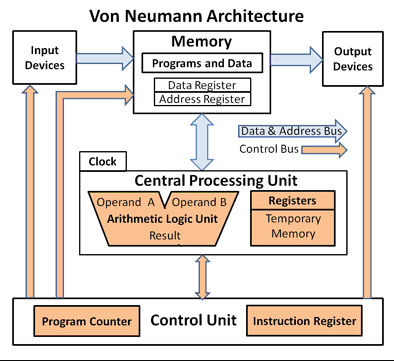
The architecture consists mainly of:
Input
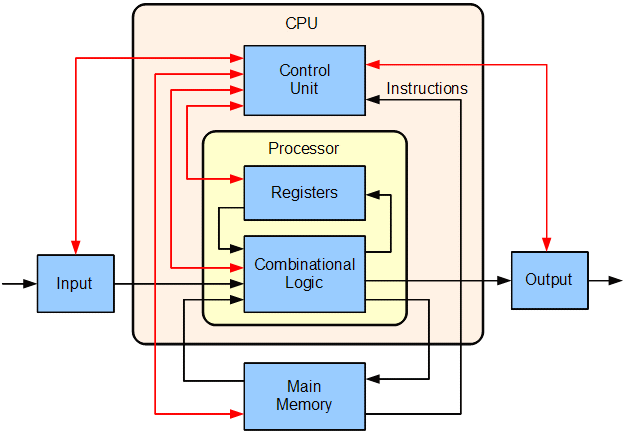
Memory
Control Unit
Arithmetic and Logic Unit
Output
The ALU and Control Unit together form the CPU.
FEATURES OF VON NEUMANN ARCHITECTURE
The important characteristics include:
Stored-program concept
Both instructions and data are stored in memory.
Single memory
The same memory is used to store both programs and data.
Sequential instruction processing
Instructions are normally fetched and executed one after another.
Central processing
The CPU controls the processing and execution of instructions.
Use of buses
Data, instructions and addresses are transferred through communication pathways called buses.
VON NEUMANN BOTTLENECK
The Von Neumann bottleneck refers to the limitation caused by the CPU and memory sharing a communication pathway.
The CPU may be capable of processing instructions very quickly, but it may have to wait for data and instructions to be transferred between memory and the CPU.
This can reduce overall computer performance.
Ways modern computers reduce this problem include:
*Cache memo
*Multiple levels of cache
*Faster memory
*Improved buses
*Pipelining
*Multiple processing cores
SYSTEM BUS
A bus is a communication pathway used to transfer information between different components of a computer.
The major types of system buses are:
Data bus
Address bus
Control bus
1. DATA BUS
The data bus carries data between the CPU, memory and other components.
For example, when the CPU needs data stored in RAM, the data bus helps transfer that data.
2. ADDRESS BUS
The address bus carries the address of the memory location that the CPU wants to access.
It helps the computer identify where data should be read from or written to.
3. CONTROL BUS
The control bus carries control signals between components.
*It helps coordinate activities such as:
*Read operations
*Write operations
*Interrupt signals
*Timing and control signals
FETCH-DECODE-EXECUTE CYCLE
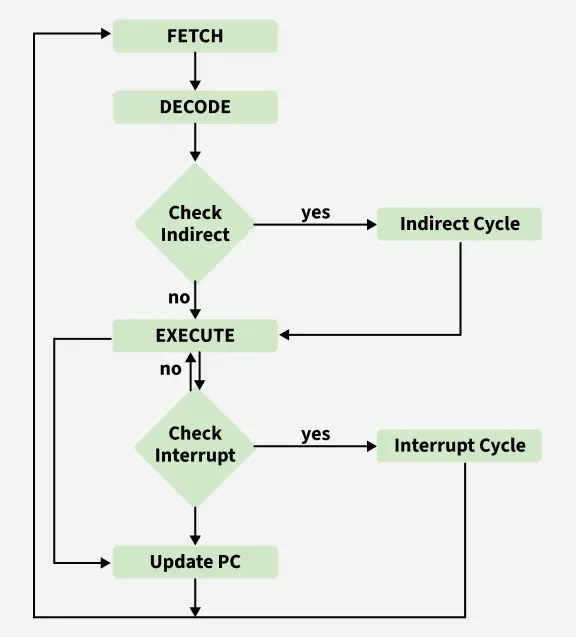
The CPU processes instructions through a sequence commonly called the fetch-decode-execute cycle.
Step 1: Fetch
The CPU obtains the next instruction from memory.
Step 2: Decode
The Control Unit interprets the instruction to determine what needs to be done.
Step 3: Execute
The appropriate operation is carried out.
For example, if the instruction tells the computer to add two numbers, the ALU performs the required calculation.
Step 4: Store
The result may be stored in a register or memory.
COMPUTER ARCHITECTURE AND COMPUTER ORGANIZATION
Although the terms are closely related, they are not exactly the same.
Computer Architecture
Computer architecture describes the design and functional behaviour of a computer system from the programmer's or user’s perspective.
It includes: Instruction set, Data types, Memory addressing, Registers and Input/output mechanisms
Computer Organization
Computer organization describes how the architecture is physically implemented.
It includes: Control signals, Hardware connections, Memory technology, Buses, Circuit design, CPU implementation
Difference
Computer Architecture Computer Organization
Describes what the system does Describes how it is implemented
More concerned with functional design More concerned with physical arrangement
Includes instruction set Includes control signals and hardware connections
Visible to programmers Mostly concerned with hardware implementation
TYPES OF COMPUTER ARCHITECTURE
Some important types and approaches include:
Von Neumann Architecture
Stores instructions and data in the same memory.
Harvard Architecture
Uses separate memory and pathways for instructions and data.
Modified Harvard Architecture
Combines some features of Von Neumann and Harvard architectures and is commonly used in modern processors and embedded systems.
HARVARD ARCHITECTURE
In the Harvard architecture, instructions and data are stored separately.
This means the processor can potentially access instructions and data through separate pathways.
Advantage
It can allow instruction and data access to occur more independently.
Disadvantage
It can require a more complex design because separate memory systems and pathways are involved.
FACTORS AFFECTING COMPUTER PERFORMANCE
Computer performance depends on several factors.
CPU speed
A faster processor can execute instructions more quickly, although speed alone does not determine overall performance.
Number of CPU cores
Modern processors may have multiple cores, allowing several tasks to be processed more efficiently.
RAM capacity
Adequate RAM allows the computer to work with more active programs and data.
Cache memory
Larger or more effective cache can reduce the time needed to access frequently used data.
Storage technology
An SSD generally provides faster access than a traditional HDD.
Bus speed and bandwidth
Faster communication pathways can improve the transfer of data between components.
Graphics Processing Unit (GPU)
A capable GPU is important for graphics-intensive applications such as computer-aided design, video editing and some games.
Software optimization
Well-designed software can make better use of available hardware resources.
IMPORTANCE OF STUDYING COMPUTER ARCHITECTURE
Understanding computer architecture helps students to:
Understand how computers work internally.
Understand the functions of hardware components.
Make better decisions when selecting computer hardware.
Understand how the CPU processes instructions.
Understand memory and storage systems.
Identify possible causes of performance problems.
Understand how software interacts with hardware.
Develop better programming and troubleshooting skills.
Understand modern computer systems.
Prepare for advanced studies in computer science and technology.
SUMMARY
Computer architecture is the study of the structure, design and operation of computer systems. A computer system consists of input, processing, memory, storage and output components.
The CPU is the major processing component and contains the ALU, Control Unit and registers. Memory includes primary memory such as RAM and ROM, while secondary storage includes HDDs, SSDs and flash drives.
The Von Neumann architecture stores data and instructions in the same memory. The CPU executes instructions through the fetch-decode-execute cycle.
Communication between computer components occurs through buses, particularly the data bus, address bus and control bus.
Computer architecture is different from computer organization, although both are closely related. Understanding these concepts helps students understand how modern computers function and how their performance can be improved.
Evaluation
OBJECTIVE QUESTIONS
1. What is computer architecture primarily concerned with?
A. Designing buildings
B. The structure and operation of computer systems
C. Writing only computer games
D. Repairing electrical appliances
2. Which component of the CPU performs arithmetic and logical operations?
A. Control Unit
B. Register
C. ALU
D. Power Supply
3. Which of the following is responsible for coordinating the activities of the computer?
A. Control Unit
B. Hard Disk
C. Monitor
D. Keyboard
4. Which type of memory is generally volatile?
A. ROM
B. RAM
C. SSD
D. Flash drive
5. In the Von Neumann architecture, data and instructions are stored in ________.
A. Separate keyboards
B. The same main memory
C. The monitor
D. The printer
6. Which bus carries the actual data between computer components?
A. Address bus
B. Control bus
C. Data bus
D. Power bus
7. What is the first stage of the CPU instruction cycle?
A. Execute
B. Decode
C. Fetch
D. Print
8. Which of the following is an example of secondary storage?
A. Register
B. Cache
C. SSD
D. Control Unit
9. Which register normally holds the address of the next instruction to be executed?
A. Program Counter
B. Accumulator
C. Instruction Register
D. Memory Data Register
10. What is the main idea behind Harvard architecture?
A. It uses no memory
B. It stores data and instructions separately
C. It has no CPU
D. It uses only secondary storage
THEORY QUESTIONS
1a. What is Von Neumann architecture? State four characteristics of the architecture.
1b. Explain the following types of system buses:
Data bus
Address bus
Control bus.
1c) Explain the fetch-decode-execute cycle and distinguish between computer architecture and computer organization.